
Order Management
Every order from every channel, in one list.
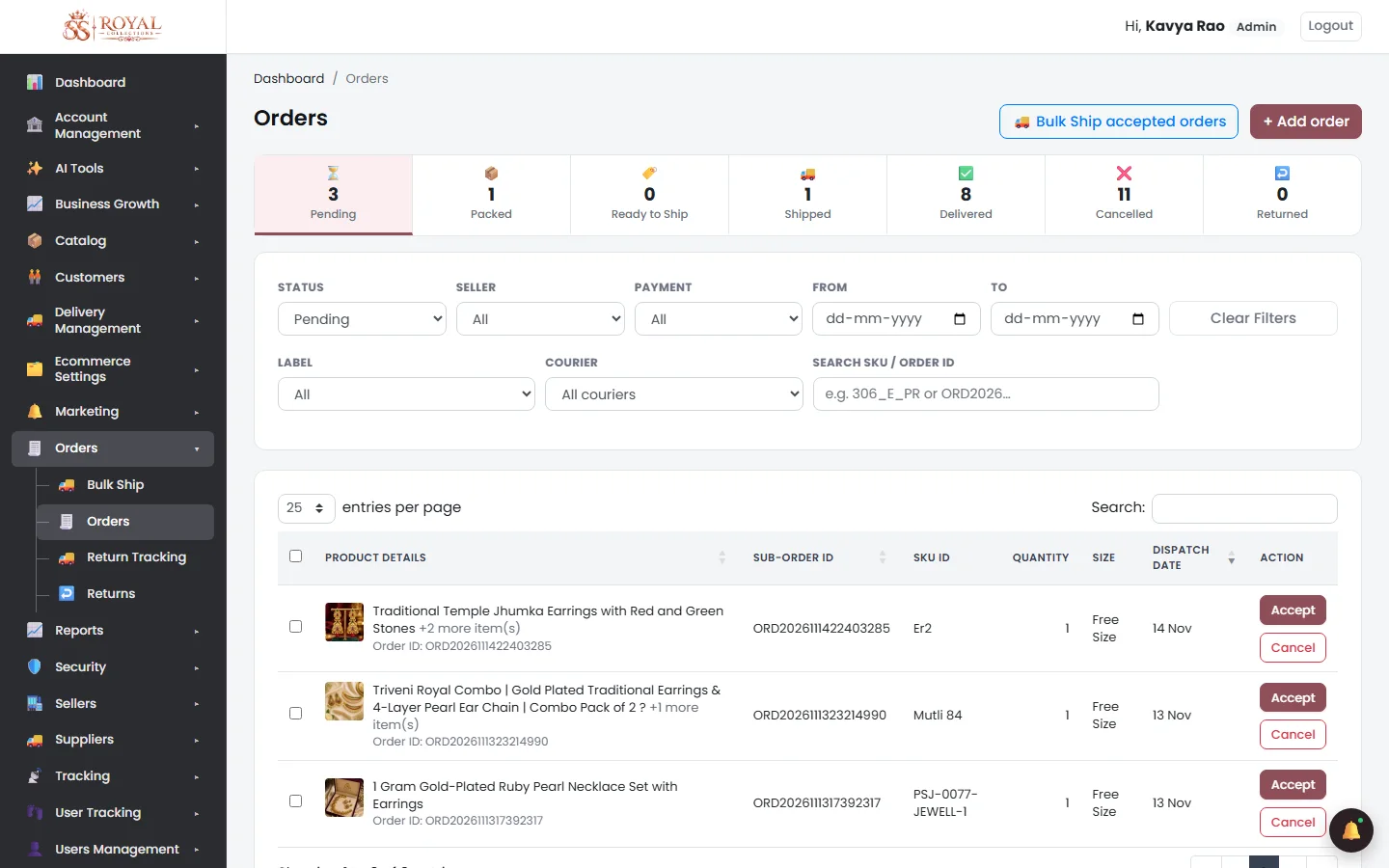
/admin/orders Click to enlargeOn this page
Quick summaryOverviewFeaturesStep by stepKey termsBest practicesFAQPlan availabilityRelated docsQuick summary
The 30-second version of this page.
Every order from every channel, in one list.
Order-processing staff, packers and managers.
Admin Panel → Orders
#Overview
Website, marketplace and manual orders flow into a single list with status tiles (Pending, Packed, Ready to Ship, Shipped, Delivered, Cancelled, Returned). Filter, search, bulk-update and print in seconds.
Order-processing staff, packers and managers.
Admin Panel → Orders
#Features
#Step by step
Follow these steps in order. The screen on the right shows where you do it.
- 1
Pick a status tile
Pending, Packed, Ready to Ship, Shipped, Delivered, Cancelled and Returned tiles show live counts. Click one to filter the list.
- 2
Search and filter
Search by order number, customer, phone or AWB; filter by date, payment method, channel or status.
- 3
Process in bulk
Select orders and change status, print GST invoices or packing labels for all of them at once.
- 4
Open an order
The order page shows items, payment, shipment, return, notes and a full timeline of every change and who made it.
- 5
Create manual orders
Taking an order on the phone or WhatsApp? Create it manually, look up the customer by phone and choose payment status.
/admin/orders Click to enlarge#Key terms
Words you will see on these screens, explained simply.
- Order timeline
- An audit trail of every event — payment captured, status changes, shipment booked, tracking scans, return raised, refund issued — with time and user.
- Channels
- Each order is tagged Website, Manual, Meesho, Amazon or Flipkart so you can filter and report by channel.
- GST invoice
- Generated automatically with HSN, tax rate and inter-state / intra-state split based on the shipping address.
#Best practices
- Process the Pending tile first thing in the morning and the Ready to Ship tile before courier pickup time.
- Add an internal note when a customer calls — the next staff member sees the context in the timeline.
- Use bulk invoice printing to keep paper and labels in the same order as the picking list.
#FAQ
Can I edit an order after it is placed?
Yes, until it is shipped. Changes are recorded in the timeline.
What happens to stock when I cancel?
Reserved stock is released back to available automatically.
#Plan availability
See pricing for full plan details.